Tabs
Examples#
Basic Example#
import flet as ft


def main(page: ft.Page):
    page.add(
        ft.Tabs(
            selected_index=1,
            length=3,
            expand=True,
            content=ft.Column(
                expand=True,
                controls=[
                    ft.TabBar(
                        tabs=[
                            ft.Tab(label="Tab 1"),
                            ft.Tab(label="Tab 2", icon=ft.Icons.SETTINGS),
                            ft.Tab(
                                label=ft.CircleAvatar(
                                    foreground_image_src="https://avatars.githubusercontent.com/u/7119543?s=88&v=4"
                                ),
                            ),
                        ]
                    ),
                    ft.TabBarView(
                        expand=True,
                        controls=[
                            ft.Container(
                                content=ft.Text("This is Tab 1"),
                                alignment=ft.Alignment.CENTER,
                            ),
                            ft.Container(
                                content=ft.Text("This is Tab 2"),
                                alignment=ft.Alignment.CENTER,
                            ),
                            ft.Container(
                                content=ft.Text("This is Tab 3"),
                                alignment=ft.Alignment.CENTER,
                            ),
                        ],
                    ),
                ],
            ),
        )
    )


ft.run(main)
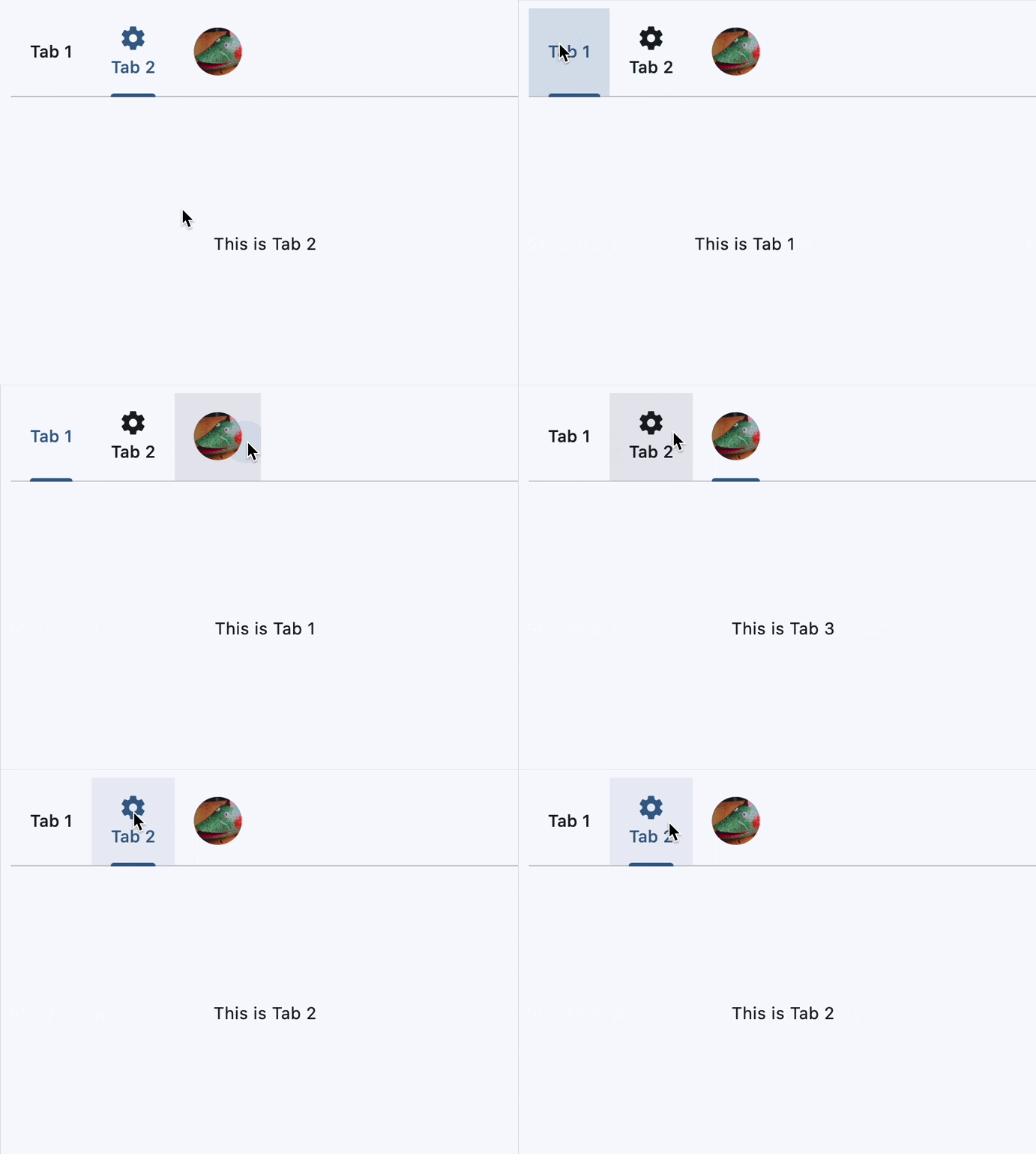
Nesting tabs#
import flet as ft


def main(page: ft.Page):
    page.add(
        ft.Tabs(
            length=2,
            expand=True,
            content=ft.Column(
                expand=True,
                controls=[
                    ft.TabBar(
                        tabs=[
                            ft.Tab(label=ft.Text("Main Tab 1")),
                            ft.Tab(label=ft.Text("Main Tab 2")),
                        ],
                    ),
                    ft.TabBarView(
                        expand=True,
                        controls=[
                            ft.Text("Main Tab 1 content"),
                            ft.Tabs(
                                length=2,
                                expand=True,
                                content=ft.Column(
                                    expand=True,
                                    controls=[
                                        ft.TabBar(
                                            secondary=True,
                                            tabs=[
                                                ft.Tab(label=ft.Text("SubTab 1")),
                                                ft.Tab(label=ft.Text("SubTab 2")),
                                            ],
                                        ),
                                        ft.TabBarView(
                                            expand=True,
                                            controls=[
                                                ft.Text("Nested Tab 1 content"),
                                                ft.Text("Nested Tab 2 content"),
                                            ],
                                        ),
                                    ],
                                ),
                            ),
                        ],
                    ),
                ],
            ),
        )
    )


ft.run(main)
Dynamic tab addition#
import flet as ft


class MyContainer(ft.Container):
    def __init__(self, text):
        super().__init__(
            height=100,
            bgcolor=ft.Colors.random(),
            alignment=ft.Alignment.CENTER,
        )
        self.content = ft.Text(text)


def main(page: ft.Page):
    def handle_new_tab(e: ft.Event[ft.CupertinoFilledButton]):
        tab_count = len(tab_bar.tabs) + 1
        tab_bar.tabs.append(ft.Tab(label=ft.Text(f"Tab {tab_count}")))
        tab_view.controls.append(MyContainer(text=f"Tab {tab_count} content"))
        tabs.length = len(tab_bar.tabs)

    page.add(
        tabs := ft.Tabs(
            length=2,
            expand=True,
            content=ft.Column(
                expand=True,
                controls=[
                    tab_bar := ft.TabBar(
                        tab_alignment=ft.TabAlignment.CENTER,
                        tabs=[
                            ft.Tab(label=ft.Text("Tab 1")),
                            ft.Tab(label=ft.Text("Tab 2")),
                        ],
                    ),
                    ft.Row(
                        alignment=ft.MainAxisAlignment.CENTER,
                        controls=[
                            ft.CupertinoFilledButton(
                                content="Add New Tab",
                                icon=ft.Icons.ADD,
                                on_click=handle_new_tab,
                            ),
                        ],
                    ),
                    tab_view := ft.TabBarView(
                        expand=True,
                        controls=[
                            MyContainer(text="Tab 1 content"),
                            MyContainer(text="Tab 2 content"),
                        ],
                    ),
                ],
            ),
        )
    )


ft.run(main)
Custom indicator#
import flet as ft


def main(page: ft.Page):
    page.add(
        ft.Tabs(
            length=2,
            expand=True,
            content=ft.Column(
                expand=True,
                controls=[
                    ft.TabBar(
                        tab_alignment=ft.TabAlignment.START,
                        indicator_animation=ft.TabIndicatorAnimation.ELASTIC,
                        indicator_size=ft.TabBarIndicatorSize.LABEL,
                        indicator=ft.UnderlineTabIndicator(
                            border_side=ft.BorderSide(5, color=ft.Colors.RED),
                            border_radius=ft.BorderRadius.all(1),
                            insets=ft.Padding.only(bottom=5),
                        ),
                        # indicator_thickness=5,
                        # indicator_color=ft.Colors.RED,
                        tabs=[
                            ft.Tab(label=ft.Text("Home")),
                            ft.Tab(label=ft.Text("My Account")),
                        ],
                    ),
                    ft.TabBarView(
                        expand=True,
                        controls=[
                            ft.Text("Home Tab Content"),
                            ft.Text("Profile Tab Content"),
                        ],
                    ),
                ],
            ),
        )
    )


ft.run(main)
Programmatical Tab switch#
import random

import flet as ft


def main(page: ft.Page):
    async def handle_move_to_random(e: ft.Event[ft.FloatingActionButton]):
        # random index, excluding the current one
        i = random.choice([i for i in range(tabs.length) if i != tabs.selected_index])

        await tabs.move_to(
            index=i,
            animation_curve=ft.AnimationCurve.FAST_OUT_SLOWIN,
            animation_duration=ft.Duration(seconds=3),
        )

    page.floating_action_button = ft.FloatingActionButton(
        icon=ft.Icons.MOVE_UP,
        content="Move to a random tab",
        on_click=handle_move_to_random,
    )

    page.add(
        tabs := ft.Tabs(
            length=6,
            selected_index=5,
            expand=True,
            content=ft.Column(
                expand=True,
                controls=[
                    ft.TabBar(
                        tab_alignment=ft.TabAlignment.CENTER,
                        tabs=[
                            ft.Tab(label=ft.Text("Tab 1")),
                            ft.Tab(label=ft.Text("Tab 2")),
                            ft.Tab(label=ft.Text("Tab 3")),
                            ft.Tab(label=ft.Text("Tab 4")),
                            ft.Tab(label=ft.Text("Tab 5")),
                            ft.Tab(label=ft.Text("Tab 6")),
                        ],
                    ),
                    ft.TabBarView(
                        expand=True,
                        controls=[
                            ft.Container(
                                content=ft.Text("Tab 1 content"),
                                alignment=ft.Alignment.CENTER,
                            ),
                            ft.Container(
                                content=ft.Text("Tab 2 content"),
                                alignment=ft.Alignment.CENTER,
                            ),
                            ft.Container(
                                content=ft.Text("Tab 3 content"),
                                alignment=ft.Alignment.CENTER,
                            ),
                            ft.Container(
                                content=ft.Text("Tab 4 content"),
                                alignment=ft.Alignment.CENTER,
                            ),
                            ft.Container(
                                content=ft.Text("Tab 5 content"),
                                alignment=ft.Alignment.CENTER,
                            ),
                            ft.Container(
                                content=ft.Text("Tab 6 content"),
                                alignment=ft.Alignment.CENTER,
                            ),
                        ],
                    ),
                ],
            ),
        )
    )


ft.run(main)
Bases: LayoutControl, AdaptiveControl
Used for navigating frequently accessed, distinct content categories. Tabs allow for navigation between two or more content views and relies on text headers to articulate the different sections of content.
| RAISES | DESCRIPTION |
|---|---|
ValueError
|
If |
IndexError
|
If |
animation_duration: DurationValue = field(
    default_factory=lambda: Duration(milliseconds=100)
)
The duration of tab animations. For example, the animation that occurs when the selected tab changes.
length: int
The total number of tabs.
Typically greater than one.
Note
Must match the length of both TabBar.tabs
and TabBarView.controls. Don't forget to update
it when adding/removing tabs.
on_change: ControlEventHandler[Tabs] | None = None
Called when selected_index changes.
The data property of the event handler argument
contains the index of the selected tab.
selected_index: int = 0
The index of the currently selected tab.
Supports Python-style negative indexing, where -1 represents the last tab,
-2 the second to last, and so on.
Note
- Must be in range
[-length, length - 1]. - Changing the value of this property will internally trigger
move_towithanimation_durationandAnimationCurve.EASEanimation curve. To specify a different animation curve or duration for this particular change, usemove_todirectly.
move_to(
    index: int,
    animation_curve: AnimationCurve = EASE_IN,
    animation_duration: DurationValue | None = None,
)
Selects the tab at the given index.
Additionally, it triggers on_change event and updates
selected_index.
Note
If index is negative, it is interpreted as a Python-style negative index
(e.g., -1 refers to the last tab). If the resolved index is already the
currently selected tab, the method returns immediately and does nothing.
| PARAMETER | DESCRIPTION |
|---|---|
index
|
The index of the tab to select. Must be between in range
TYPE:
|
animation_curve
|
The curve to apply to the animation.
TYPE:
|
animation_duration
|
The duration of the animation. If
TYPE:
|
| RAISES | DESCRIPTION |
|---|---|
IndexError
|
If the |